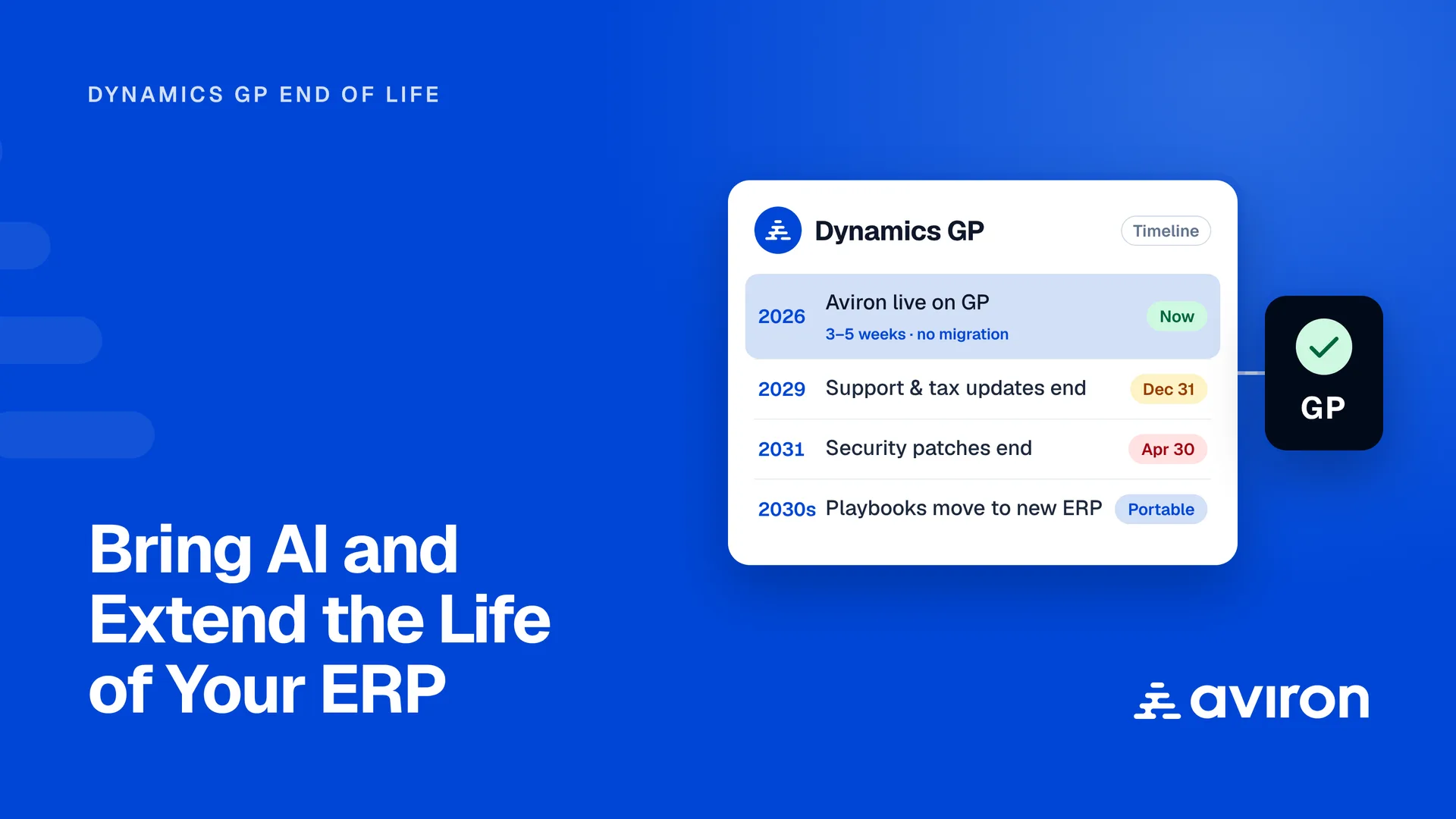
Microsoft has set the Dynamics GP end-of-life milestones in motion, establishing hard operational deadlines for mid-market finance teams. Under official Microsoft lifecycle policies, product updates, regulatory and tax updates, and technical support for Dynamics GP end on December 31, 2029. Security patches continue through April 30, 2031, with no paid extended security updates planned after that date. For companies running GP Payroll, December 31, 2029 is a hard operational cutoff for tax tables; for core financials, AP, AR, purchasing, and inventory, perpetual licenses remain usable and patched into 2031.
For CFOs and VPs of Finance running manufacturers, distributors, and food and beverage companies with $50M to $2B in revenue, this timeline forces a deliberate sequencing decision. Organizations have a three- to five-year runway before the Dynamics GP sunset becomes an acute security risk. Waiting until migration freezes back-office modernization and locks in years of unnecessary manual labor. Rushing a multi-year cloud ERP replacement just to fix AP and AR exposes the business to steep capital costs and operational disruption.
There is a practical middle path. Aviron is an agentic platform for finance operations that automates procure-to-pay and order-to-cash by executing inside the client's existing ERP, not as a bolt-on. Agents follow a plain-English Business Playbook that encodes each client's rules. Pairing this agentic finance automation with Dynamics GP lets finance teams go live in 3 to 5 weeks, cut manual finance work by 80%+, and keep their operational rules intact when they eventually transition to a new ERP in the 2030s.
Should You Migrate Off Dynamics GP Now or Wait?
Neither freezing modernization until 2029 nor rushing an immediate ERP migration pencils out for most mid-market finance teams. Value-added resellers often pitch an immediate, multi-hundred-thousand-dollar cloud migration as the only response to the Dynamics GP sunset, but CFOs planning for 2029 and 2031 face two distinct financial traps.
Trap 1: The Cost of Freezing Back-Office Modernization
Waiting until a 2029 migration to fix Accounts Payable (AP) and Accounts Receivable (AR) locks in massive operational debt across the next 36 to 60 months. Manual or non-best-in-class invoice processing costs $12 to $15 per invoice, compared to $2 to $3 for best-in-class automated operations. Industry benchmarks from Ardent Partners cite an average of $12.88 per invoice for manual shops, while APQC places top-quartile automated processing at roughly $2.36 to $2.78 per invoice.
Those per-invoice gaps compound quickly over a multi-year runway. A mid-market group processing 27,000 supplier invoices per year at the industry average of 12 minutes per invoice spends 5,400 manual hours annually on AP alone, roughly the capacity of three full-time staff keying entries and chasing approvals by email. Delaying modernization for four years absorbs 21,600 hours of finance capacity in a fragmented stack of GP screens, spreadsheets, and shared inboxes.
Staff turnover and upcoming retirements compound that operational debt. In long-running Dynamics GP environments, critical judgment calls such as vendor GL mappings, freight allocations, and manufacturer rebate reconciliations often live in the heads of a few experienced AP clerks rather than in documented system logic. Leaving that tribal knowledge undocumented until an ERP cutover creates serious continuity risk.
Trap 2: The Risk and Cost of a Rushed ERP Replacement
Rushing an ERP migration to systems like Microsoft Dynamics 365 Business Central or Finance & Operations just to achieve basic workflow automation exposes the business to extreme risk. According to Gartner, more than 70% of recently implemented ERP initiatives fail to fully meet their original business case goals. Panorama Consulting Group's 2026 ERP Report notes that 30% of ERP projects run over budget. The primary cause of those budget overruns, cited by 54.9% of respondents, is the need to purchase additional technology to meet project goals. That reflects a reality most controllers already see: a new ERP still leaves last-mile workflows unsolved out of the box.
The direct capital and timeline commitments are equally heavy. A mid-market migration from Dynamics GP to Business Central typically runs $150,000 to $250,000 over four to eight months, with an 18- to 24-month break-even horizon. Moving to Dynamics 365 Finance & Operations can cost $200,000 to over $2,000,000 and take six to 24 months. Even after cutover, standard ERP workflows optimize for the "happy path" and break down on day-to-day physical-goods exceptions like partial shipments, unquoted liftgate fees, pack-size notations such as 6/10#, or bilingual GST/QST invoices.
What Dynamics GP Finance Teams Should Separate Before 2029
Treating the Dynamics GP sunset as a single all-or-nothing event creates avoidable risk. Mid-market controllers and CFOs get far better leverage by separating the timeline into distinct operational workstreams:
- Decouple GP Payroll before the 2030 tax year: Because Microsoft ends regulatory and tax updates on December 31, 2029, payroll cannot ride on GP into 2030. Moving payroll to a dedicated payroll provider ahead of 2029 removes the hardest compliance wall without forcing a premature core ERP swap.
- Clean master data and document exceptions while GP is stable: Migrating dirty vendor tables, inconsistent GL coding, and undocumented approval rules simply carries chaos into a new ERP. Standardizing coding logic, tolerances, and exception paths now reduces future migration scope and consulting hours.
- Stop funding GP-specific dead ends: Avoid sinking budget into custom GP scripts, one-off file bridges, or third-party add-ons whose setup fees disappear the day Dynamics GP is retired.
Why Are Bolt-On AP and AR Portals a Sunk Cost on Dynamics GP?
Traditional bolt-on AP and AR portals, OCR templates, and RPA scripts require heavy custom integration work into Dynamics GP that cannot be reused after a migration, while still stalling on real-world invoice exceptions. For finance teams seeking relief before 2029 without swapping ERPs, legacy overlay tools usually create a second layer of technical debt.
Most traditional AP overlay tools expect a modern Application Programming Interface (API) and a generic invoice object. When connecting to heavily customized legacy ERPs, they fall back on file-based CSV or FTP batch transfers that drop line-item detail, stall IT backlogs for months, and leave finance paying for GP-specific connectors that get scrapped the day the system retires.
Furthermore, legacy automation is brittle. OCR and RPA fail as soon as real-world exceptions appear, such as price variances, contract freight, unit of measure conversions, or multi-PO overseas invoices. In production scenarios, legacy OCR and RPA projects stall at 20% to 30% automation coverage, dumping the remaining 70% to 80% of exception-heavy invoices back onto human queues. These platforms offer extraction without execution, reading an invoice only to hand fields back to a person to finish the work.
How Can You Modernize Finance Operations Inside Dynamics GP Without Rebuilding Later?
Deploying an agentic execution layer directly on top of Dynamics GP removes manual AP and AR bottlenecks today while keeping your operating logic separate from the underlying ERP database. Rather than paying for throwaway GP middleware or forcing a premature cloud cutover, finance teams can deploy Aviron inside their current environment and build a cleaner foundation for an eventual migration.
Aviron works on top of the ERP you already run, turning inbox, spreadsheet, and approval work into governed workflows without replacing Dynamics GP. Because vendor rules, GL coding logic, matching tolerances, and exception paths live in plain-English Business Playbooks rather than hardcoded ERP customizations, institutional knowledge stays documented and owned by finance.
Deployment takes just 3 to 5 weeks with minimal IT lift, requiring roughly one hour of IT time to provision scoped, revocable access. During Weeks 1 and 2, Aviron connects to the ERP, document environments, and mailboxes, mining historical postings to draft the first rulebook. In Week 3, a deep-dive session with the accounting team confirms routing and tolerances. Weeks 4 and 5 involve sandbox testing, validation, and training before the final go-live decision.
Aviron supports ERP integrations across Microsoft Dynamics 365 (Business Central and Finance & Operations), Microsoft Dynamics GP (Great Plains), Microsoft Dynamics NAV, Oracle NetSuite, SAP (S/4HANA and Business One), JD Edwards, Sage (Intacct and 300), Infor LN, and Deltek Maconomy. When a company eventually migrates off Dynamics GP in the 2030s, the ERP interface is updated for the new system while the approved Business Playbook, coding rules, and exception pathways carry forward intact instead of being rediscovered from scratch.
Executing Inside Dynamics GP: Connected Procure-to-Pay Workflows
Evaluating automation ahead of the Dynamics GP sunset requires looking closely at how transactions actually move from intake to posting. The ERP remains the system of record. Aviron serves as the single control plane (with one central dashboard where finance teams track ownership, exceptions, and audit trails) while autonomous AI agents execute the work directly inside the existing ERP, inboxes, and portals.
Across the purchasing cycle, Aviron's procure-to-pay workflows connect three core stages inside Dynamics GP.
1. Purchase Request Processing & Approval
Requests enter via email, Microsoft Teams, the central dashboard, or automated ERP and Excel triggers such as min-max inventory thresholds. Aviron's agents extract requested items, match them against the Dynamics GP item catalog for descriptions, pricing, and vendor data, and route approvals in Microsoft Teams based on department, vendor, or dollar thresholds so approvers can act without needing a paid ERP user seat. Approved requests automatically create purchase orders in Dynamics GP, while blocked vendors or missing details route to a named owner under "needs attention."
2. Receipt Processing & Inventory Validation
Packing slips and receiving documents arriving by email are matched to the corresponding Dynamics GP purchase order and checked line by line against ordered quantities. Clean matches post purchase receipts directly into Dynamics GP to update inventory. When a PO has no matching receipt within a configurable window, or when quantities disagree, the discrepancy surfaces in the "needs attention" queue with automated follow-ups so buyers can adjust quantities, select the right PO, or escalate.
3. Invoice Processing, Approval & Three-Way Matching
Supplier invoices continue arriving at existing payables mailboxes with zero vendor portal onboarding. Aviron's agents extract header and line-item data, run a three-way match against the PO and posted receipt, and validate invoiced rates against centralized contract price grids for raw materials or freight, accounting for effective dates and configurable tolerances. Invoices within tolerance post automatically into Dynamics GP with line-level GL coding, driving 95%+ straight-through processing without redundant approvals on pre-approved POs.
Non-PO invoices for services, utilities, or office supplies are classified, GL-coded, routed through Microsoft Teams for approval, and posted to Dynamics GP upon sign-off.
Human Review Interface & Plain-English Business Playbooks
When an exception requires human judgment, finance reviewers work from a single screen displaying the annotated PDF, editable fields, and side-by-side comparisons across the PO, receipt, invoice, and contract, with one-click posting to Dynamics GP. Every validation, routing, and coding rule lives in a plain-English Business Playbook initially drafted from historical ERP postings; finance leaders can edit rules anytime without IT support, with every decision logged in a real-time audit trail.
Working Capital and Cash Conversion: Order-to-Cash Impact
Modernizing AP alone leaves half of the working-capital equation untouched. On the receivables side, Aviron's order-to-cash agents capture complex customer orders from email, PDF, and EDI in minutes and manage collections systematically based on Dynamics GP aging and invoice value, sending pre-due-date reminders, acting on replies, updating statements, and assembling escalation files past 60 days while respecting rules for strategic accounts.
In production across mid-market manufacturing and distribution teams, connecting P2P and O2C execution delivers measurable CFO-level outcomes:
- Working Capital and DPO: Eliminating invoice approval backlogs enables DPO steering, disciplined payment batching, and automatic capture of early-payment terms such as 2/10 net 30.
- Cash Conversion Cycle: In distribution deployments, cutting complex order intake from days to minutes alongside structured collections has removed up to 15 days from the cash conversion cycle.
- DSO Compression: Consistent pre-due-date follow-up and automated escalation across thousands of monthly receivables compress Days Sales Outstanding (DSO) without over-chasing reliable long-cycle accounts.
- M&A Capacity and EBITDA Protection: In production, distribution groups have absorbed 100% growth by acquisition with zero back-office hires, bringing newly acquired entities onto existing agents and Playbooks in days rather than months.
A Phased Dynamics GP Roadmap Through 2031
Treating the Dynamics GP lifecycle as a phased five-year plan removes the pressure to make a rushed ERP decision. In 2026 and 2027, focus on stabilizing AP and AR operations, eliminating manual data entry, and capturing vendor coding, tolerances, and approval rules inside a documented Business Playbook before experienced staff retire. Through 2028 and 2029, decouple GP Payroll onto a dedicated payroll provider ahead of the December 31, 2029 tax-update cutoff and clean up vendor and item master data.
By the time you evaluate Business Central, Dynamics 365 Finance & Operations, or another ERP ahead of the April 30, 2031 security patch deadline, the hardest part of the transition is already behind you. Your back-office processes are standardized, your working capital is already improving, and Aviron carries your operating rules forward so the ERP cutover stays focused on clean ledger migration rather than rebuilding finance operations under a deadline.
Frequently Asked Questions
Can we keep running Microsoft Dynamics GP after December 31, 2029?
Yes, for core financials like AP, AR, purchasing, and the general ledger. Perpetual Dynamics GP licenses do not shut off on December 31, 2029, and Microsoft provides security patches through April 30, 2031. However, regulatory and tax updates stop after 2029, so companies using GP Payroll must move payroll beforehand.
What happens to our AP and AR automation when we eventually migrate off Dynamics GP?
With traditional bolt-on portals, custom GP connectors become a sunk cost you abandon during a migration. With Aviron, your vendor rules, GL coding logic, tolerances, and approval hierarchies live in plain-English Business Playbooks outside the ERP. When you transition to a new ERP, the interface updates while your workflows and rules carry forward.
How long does it take to deploy agentic finance automation on Dynamics GP?
Deploying Aviron on Microsoft Dynamics GP takes 3 to 5 weeks to production and requires roughly one hour of IT time to provision scoped, revocable access. Weeks 1 and 2 cover connections and historical pattern mining, Week 3 finalizes the Business Playbook with accounting, and Weeks 4 and 5 handle sandbox validation and training.
How does Aviron secure finance operations and client data?
Aviron is SOC 2 Type II audited, maintains a 99.95% platform uptime SLA, and hosts data in Canada under commercial terms that prohibit model training on client data. System access is provisioned progressively, scoped narrowly to required workflows, and revocable in one click, with a real-time audit trail recorded on every transaction.