Why Does OCR Fail in AP Automation, and How Do AI Agents Reach 90% Straight-Through Processing?
Optical character recognition (OCR) fails to fully automate accounts payable because reading text from an invoice represents only 20% of the procure-to-pay workflow, while the remaining 80% requires business logic, multi-line purchase order matching, tax validation, and exception resolution. Finance teams break through the OCR ceiling by deploying Aviron, an AI operating system for finance that executes directly inside existing ERPs using a plain-English Business Playbook to achieve a 90%+ manual-work reduction.
At a Glance:
- $9.84 vs. $2.65: Average cost to process an invoice versus best-in-class AP teams (Ardent Partners).
- $6.00 vs. $2.07: Cross-industry median cost per invoice (APQC) compared to top-quartile performers (APQC via CFO.com).
- 87% of CFOs: Predict AI will be extremely or very important to finance operations (Deloitte CFO Signals).
- 90%+ Manual-Work Reduction: Outcome achieved when Aviron, an AI operating system for finance, executes procure-to-pay workflows inside your ERP.
Why Does OCR Plateau in Accounts Payable Automation?
Standalone OCR plateaus in accounts payable because optical character recognition only converts document images into text and cannot apply vendor-specific matching rules, general ledger (GL) coding, or exception logic. While template-based capture handles standardized PDFs from top domestic suppliers, real-world manufacturing, distribution, and food and beverage payables break down as soon as layout variations, freight surcharges, or purchase order discrepancies appear.
In day-to-day AP operations, exceptions pile up rapidly once you move past the top five vendors. A supplier changes an invoice layout, a vendor in Quebec sends a bilingual PDF with GST and QST lines, a scanned packing slip arrives crooked, or a fuel surcharge appears outside the purchase order header. An OCR tool reads the characters on the page, but it does not understand what those characters mean inside your ERP.
Industry data confirms that capture-only tools leave a massive operational gap. Across accounts payable departments, 41% of AP leaders report bottlenecks and value erosion because invoice and payment approvals take too long (Ardent Partners). For a controller or AP manager processing 10,000 to 50,000 invoices annually, every unvalidated field or unmatched line item routes into an exception queue where experienced staff spend hours chasing buyers, checking receiving slips, and re-keying voucher data.
Reading characters is only the first 20% of processing an invoice. The remaining 80% of procure-to-pay execution involves three-way matching against purchase orders and receipts, contract price validation, tax verification, GL account distribution, and multi-level approval routing. Because bolt-on OCR engines lack that operational context, manual work stalls after initial data capture.
How Much Do OCR Invoice Exceptions Actually Cost Finance Teams?
OCR invoice exceptions cost mid-market finance teams tens of thousands of dollars annually in direct rework labor, missed early-payment discounts, and delayed working capital visibility. Organizations outside the best-in-class tier spend an average of $9.84 to $12.42 to process a single invoice, whereas best-in-class AP teams spend $2.65 per invoice (Ardent Partners).
How Invoice Processing Performance Compares Across AP Benchmarks
| Benchmark Tier | Cost Per Invoice | Processing Cycle Time | Operational Impact on AP & Finance |
|---|---|---|---|
| Bottom Quartile / Manual & Legacy OCR | $10.00+ (APQC via CFO.com) | 9.2 to 13.5 days (Ardent Partners) | High headcount dependency; missed early-payment discounts; slow month-end close |
| Cross-Industry Median / Average AP | $6.00 median (APQC) to $9.84 average (Ardent Partners) | 8.2 to 9.2 days (Ardent Partners) | Routine invoices extract, but PO variances, freight rules, and multi-entity taxes require manual rework |
| Top Performers / Best-in-Class AP | $2.07 (APQC via CFO.com) to $2.65 (Ardent Partners) | 2.9 days (Ardent Partners) | High throughput per FTE; early-payment discounts captured; strong working capital and EBITDA protection |
Direct processing labor is only part of the financial impact for a CFO or VP Finance. When invoices sit in an exception queue for over nine days, companies forfeit early-payment terms such as 2/10 net 30, directly eroding EBITDA and working capital. Repeated discrepancies also strain supplier relationships, delay goods receipts for critical manufacturing inputs, and create audit exposure when coding overrides are handled in ad-hoc emails rather than documented in the ERP.
Cross-industry benchmarking of 5,846 organizations places the median cost to process an accounts payable invoice at $6.00 (APQC), while top-quartile performers process an invoice for $2.07 or less (APQC via CFO.com). Closing that cost gap requires automating exception resolution and ERP posting, not buying another template reader.
What Are the Four Layers of Invoice Processing That OCR Cannot Handle?
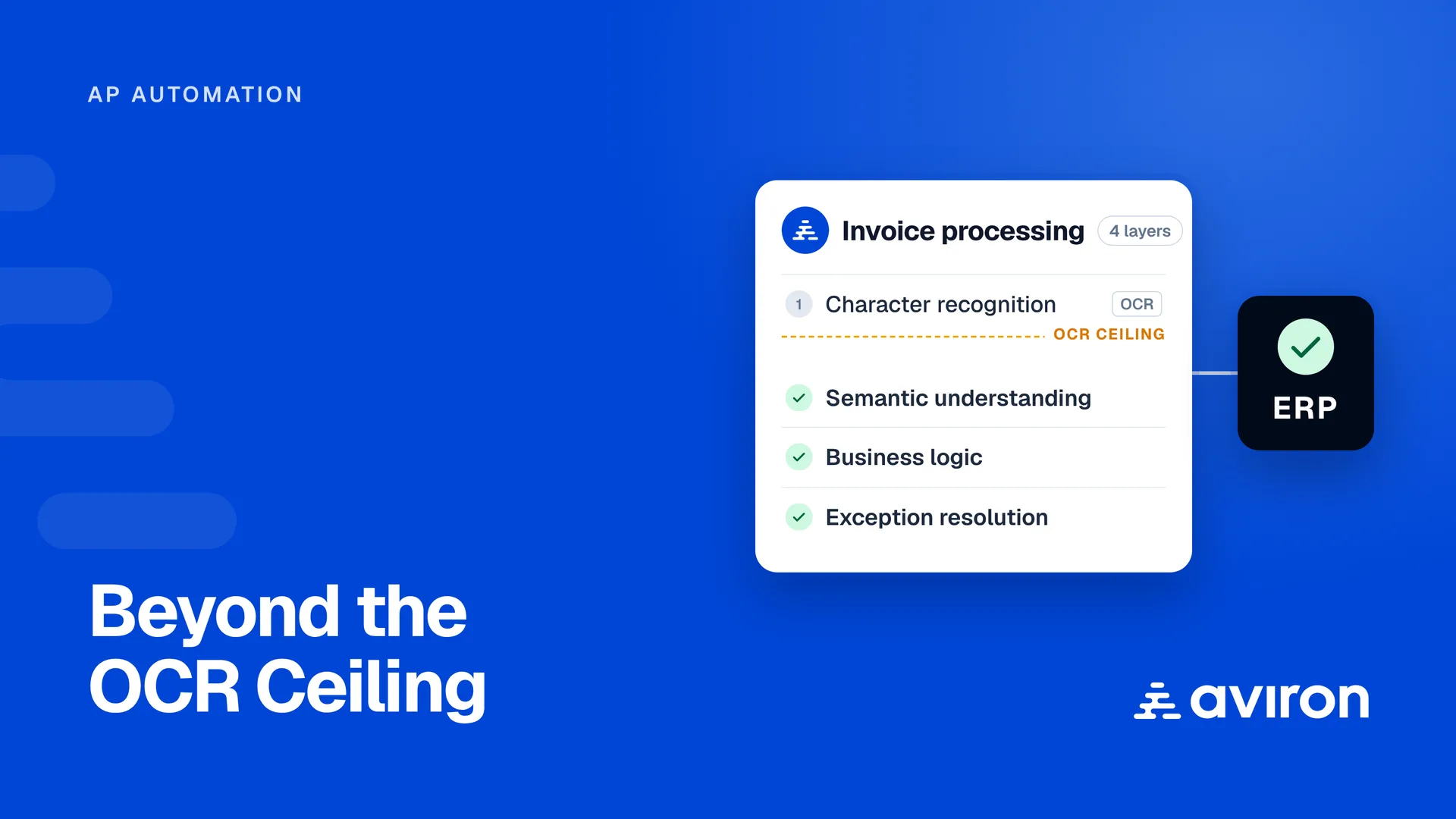
End-to-end invoice processing requires four distinct operational layers: character recognition, semantic document understanding, company-specific business logic, and autonomous exception resolution. Traditional OCR handles only the first layer, leaving AP specialists to manually execute the other three layers across email inboxes, spreadsheets, and the ERP.
1. Layer 1: Character Recognition (The 20% That OCR Delivers): Character recognition converts scanned images and PDFs into machine-readable text. While modern capture engines read clean typography well, character extraction is merely the starting point of an accounts payable transaction, not a posted voucher.
2. Layer 2: Semantic Understanding (Where Template OCR Stops): Semantic understanding means recognizing that "Total Due," "Amount Payable," "Balance Owing," and "Montant dû" on a Canadian supplier invoice all represent the same accounting field. It also means mapping a line item labeled "Freight" on one vendor's bill to "Shipping and Handling" or a specific landed-cost account in your ERP without human intervention.
3. Layer 3: Business Logic (Where AP Accuracy Actually Lives): Business logic encompasses the operational rules specific to your company. For example, Vendor X rounds up quantities, so the system must match to purchase order totals rather than individual lines. Vendor Y has a contract allowing a 3% quarterly price variance. Invoices over $25,000 route to the controller, except plant maintenance invoices, which route to the facilities director. Legacy OCR has zero visibility into these rules.
4. Layer 4: Exception Resolution (Where AP Headcount Hours Burn): When a unit of measure differs between a supplier invoice and a receiving slip, or when a purchase order number is missing, OCR tools dump the invoice into a manual exception queue. True agentic finance automation investigates the discrepancy first by checking historical vouchers, receiving logs, and contract tolerances before escalating only genuine decisions to a human.
How Does an Agentic Business Playbook Solve AP Exceptions?
An agentic Business Playbook solves AP exceptions by encoding a company's vendor-specific tolerances, GL coding rules, tax treatments, and approval hierarchies in plain English so AI agents can execute them directly inside the ERP. Aviron is an AI operating system for finance that automates procure-to-pay and order-to-cash by executing inside the client's existing ERP, not as a bolt-on. Agents follow a plain-English Business Playbook that encodes each client's rules.
Unlike a static standard operating procedure (SOP) binder that sits on a shelf or a brittle robotic process automation (RPA) script that breaks when a screen layout changes, the Business Playbook is executable operational logic. Finance teams in manufacturing, distribution, and food and beverage edit the rules in plain language without writing code or waiting on IT tickets.
When an invoice arrives in the payables inbox, Aviron's agentic finance automation reads the email and attachments, validates legal entity suffixes and GST/HST/QST or US state tax lines, performs two-way or three-way matching against purchase orders and receipts, applies Automatic Accounting Instructions (AAIs) or GL dimensions, and posts the voucher into systems such as JD Edwards, Microsoft Dynamics 365 Business Central, Finance and Operations, Infor LN, NetSuite, or Deltek Maconomy.
Because the agents execute the full workflow inside the existing system of record, finance teams achieve a 90%+ manual-work reduction without replacing their ERP or building a patchwork of bolt-on portals.
How Does OCR Compare to AI Document Processing and Agentic Finance Automation?
OCR and standalone AI document processing stop at extracting fields from a document, whereas agentic finance automation executes the entire transaction lifecycle inside the ERP. The table below compares template OCR, AI document capture, and Aviron, an AI operating system for finance, across six core procure-to-pay evaluation criteria.
| Evaluation Criteria | Template OCR | Bolt-On AI Document Capture | Aviron (AI Operating System for Finance) |
|---|---|---|---|
| Data Extraction | Reads characters from fixed templates; breaks on layout changes | Extracts header and line fields across varying document formats | Semantic understanding of emails, PDFs, spreadsheets, and packing slips in English and French |
| ERP Architecture | External capture tool requiring manual CSV uploads or custom scripts | Bolt-on overlay requiring separate portal logins and sync connectors | Executes directly inside the existing ERP (JD Edwards, Business Central, Infor LN, NetSuite, Maconomy) |
| Validation & Matching | None; passes raw text to AP clerks for manual checking | Basic header checks and generic PO matching in an external database | Cross-references POs, goods receipts, contracts, tax registries, and vendor tolerances automatically |
| Exception Handling | Routes every mismatch into a manual rework queue | Flags discrepancies; humans must research and resolve outside the tool | Investigates using the Business Playbook, drafts supplier follow-ups, and escalates only true judgment calls |
| Business Rules | None embedded | Rigid workflow rules configured by IT or external consultants | Vendor-specific tolerances, GL/AAI coding, and approval routing written in a plain-English Business Playbook |
| Manual-Work Reduction | Stalls at 20% to 30% on complex, exception-heavy payables | Reduces keystrokes but leaves exception and posting workload on staff | Achieves 90%+ manual-work reduction end to end from inbox triage to posted ERP voucher |
What Operational Results Do Mid-Market Finance Teams See When Replacing OCR with AI Agents?
Mid-market manufacturing, distribution, and food and beverage companies that replace legacy OCR and RPA with Aviron, an AI operating system for finance, achieve a 90%+ manual-work reduction while compressing processing cycles from weeks to same-day execution. Instead of stalling at 20% to 30% coverage on complex purchase order and international supplier invoices, AI agents handle end-to-end validation and ERP posting autonomously.
Consider two anonymous mid-market production deployments from the field:
- Pulp, Paper, and Manufacturing on Legacy ERP: A manufacturer running a heavily customized JD Edwards environment had previously deployed OCR and RPA, which stalled at 20% automation because of complex voucher matching, Automatic Accounting Instructions (AAIs), and freight allocation rules. By encoding those rules into Aviron's Business Playbook and executing directly inside JD Edwards, the finance team achieved a 90%+ manual-work reduction without an ERP migration.
- Multi-Supplier Beverage and Distribution Operations: A North American distributor managing thousands of monthly invoices across dozens of international suppliers faced constant exceptions from non-standard invoice layouts, multi-currency billing, and unit-of-measure conversions. Moving from OCR data capture to Aviron's agentic finance automation eliminated manual re-keying, institutionalized tribal vendor knowledge in a plain-English Business Playbook, and delivered a 90%+ manual-work reduction across the payables cycle.
- Multi-Entity Growth Without Adding Headcount: Distribution teams growing through M&A have absorbed a full year of acquired entities onto the same finance team and ERP workflow in days by applying their existing Business Playbook to each new subsidiary, cutting 15 days off the cash conversion cycle on the order-to-cash side as well.
Why Does Eliminating Manual AP Rework Matter for Finance Talent and Working Capital?
Eliminating manual AP rework protects mid-market companies against the structural accounting talent shortage while freeing working capital and improving DSO and DPO visibility. When an automation tool leaves 30% to 50% of invoices in an exception queue, experienced accounting staff remain trapped in transaction processing, creating severe operational risk whenever a key specialist retires or leaves.
When OCR Stalls, Humans Are the Glue: If your AP automation only extracts text, your team still touches almost every complex invoice. Experienced technicians must remember which supplier includes freight on the PO line, how a manufacturer rebate is reconciled, and which entity suffix is required for tax compliance. When those specialists take vacation or retire, throughput drops and month-end close stalls.
With a Business Playbook, Institutional Knowledge Compounds: When Aviron, an AI operating system for finance, executes the workflow, humans step in to make decisions rather than retype data. Every time a controller or AP specialist resolves a novel edge case, that decision is captured as a governed rule in the Business Playbook. Operational knowledge stays inside the company permanently.
The Finance Talent Shortage Makes Automation Urgent: Mid-market controllers and CFOs can no longer hire their way out of manual back-office bottlenecks.
More than 300,000 accountants and auditors have left the US profession in recent years (CPA Practice Advisor), and the annual number of new accounting graduates dropped 18.3% between 2016 and 2022 (AICPA via Journal of Accountancy). Across North America, 45% of CFOs cite a lack of skilled finance talent as a top workforce challenge, and 79% say they are likely or very likely to deploy generative AI within 24 months to bridge finance skills gaps (Deloitte CFO Signals Q1 2025). In Canada, 74% of Chartered Professional Accountants now use AI at least weekly to improve productivity and shift time toward analysis and strategic work (CPA Canada Survey).
By achieving a 90%+ manual-work reduction through agentic finance automation, finance leaders insulate their operations from turnover, absorb M&A volume without adding back-office headcount, and gain real-time visibility into cash obligations, early-payment discount windows, and working capital.
How Can Finance Teams Transition from OCR to Agentic Finance Automation?
Finance teams transition from OCR to Aviron, an AI operating system for finance, through a four-step deployment that connects to the existing ERP and goes live in weeks without an IT overhaul. Instead of starting from a blank template, Aviron mines historical posted transactions to draft the initial Business Playbook and validates execution in a controlled sandbox before production launch.
- Step 1 - Connect Systems Once (Weeks 1 to 2): Aviron connects to your existing ERP (such as JD Edwards, Business Central, Infor LN, NetSuite, or Deltek Maconomy), your AP mailbox, and your document storage. Access is provisioned with roughly one hour of IT time using scoped, revocable credentials under SOC 2 Type II audited controls and Canadian or US data residency requirements. A pattern-mining agent ingests historical invoices, purchase orders, receipts, and posted vouchers to draft the first Business Playbook from your actual transaction history.
- Step 2 - Capture Process and Exception Rules (Week 3): In focused working sessions of two to four hours with your accounting and AP specialists, the team confirms vendor-specific matching tolerances, tax rules, unit conversions, GL coding, and approval routing. The tribal knowledge held by your most experienced staff is codified in plain English.
- Step 3 - Test and Validate in Sandbox (Weeks 4 to 5): The AI agents process real invoices in your sandbox environment alongside your team. Finance users review the complete audit trail, see the plain-language reasoning behind every coding and matching decision, and learn how to update Playbook rules themselves without developers.
- Step 4 - Launch Production and Compound Weekly (Week 6 Onward): Live processing begins behind role-based approval gates that your controller governs rule by rule. Every exception resolved by a human refines the Business Playbook, driving a 90%+ manual-work reduction while preserving a real-time, searchable audit trail inside your ERP.
What Else Do Finance Leaders Ask About Moving Beyond OCR in Accounts Payable?
What is the difference between OCR and agentic finance automation?
Optical character recognition (OCR) converts scanned invoice images into raw text fields, covering only the initial data-capture step. Agentic finance automation uses AI agents guided by a plain-English Business Playbook to execute the entire workflow inside your ERP, including inbox triage, three-way PO matching, tax validation, approval routing, exception resolution, and voucher posting.
Why do bolt-on AP automation tools struggle with complex ERPs like JD Edwards or Infor LN?
Bolt-on AP overlays rely on generic invoice data models and rigid API connectors that fail when confronted with JD Edwards voucher matching and Automatic Accounting Instructions (AAIs) or customized Infor LN and Business Central environments. Aviron, an AI operating system for finance, operates directly through the ERP's native paths, achieving a 90%+ manual-work reduction without file drops.
How does an AI Business Playbook handle vendor-specific invoice exceptions?
A Business Playbook encodes your accounting team's specific operational rules in plain English, such as accepting a 3% contract price variance for a raw-materials supplier, matching to purchase order totals when a vendor rounds quantities, or routing plant maintenance invoices to facilities. AI agents apply these rules automatically and escalate only genuine judgment calls.
How long does it take to deploy Aviron on an existing ERP?
Deploying Aviron, an AI operating system for finance, typically takes five to six weeks from initial connection to live production. Because Aviron mines historical ERP postings to draft the initial Business Playbook and requires only about one hour of IT time to provision access, finance teams go live in weeks without replacing their ERP.
Assess Your AP Automation Architecture
Identify where OCR ceilings, manual exception queues, and undocumented vendor rules are costing your finance team time and working capital at aviron.ai.